The 2-Pocket Advantage: Deconstructing the "Non-Stop" Workflow of a Pro Money Counter
Update on Nov. 9, 2025, 10:50 a.m.
In the world of professional cash handling, there is a fundamental disconnect between what a “money counter” does and what a “business” needs. A basic counter simply counts a stack of pre-sorted bills. But a real-world business—like a “carwash and laundromat,” as one user noted—deals with a chaotic, heavy-flow mix of denominations, new bills, worn bills, and potential counterfeits.
The true business bottleneck is not “counting”; it’s stopping.
This has created a two-tier market: the 1-pocket “semi-automatic” counter and the 2-pocket “fully automatic” sorter. To deconstruct this critical workflow difference, we can use a “business-grade” machine like the MUNBYN IMC40 as a technical case study.

1. The 1-Pocket Bottleneck: The “Start-Stop” Problem
A 1-pocket “mixed denomination” counter is a massive leap over a “dumb” (count-only) machine. It uses 2CIS (Dual Contact Image Sensors)—high-speed scanners for both sides of the bill—to “see” and identify each denomination ($1, $5, $20, etc.).
But it has a critical workflow flaw. When it’s in “SORT” mode (sorting for $20s) and it finds a $5 bill, or when it finds a “worn” or “counterfeit” bill, the machine must “stop counting.” The operator must then “remove the sorted bill manually” and press “start” again.
For a business with a large, mixed deposit, this “start-stop-start-stop” process is a “huge time waster.” As one 5-star reviewer of the IMC40, Jay, noted, the primary benefit of his new machine is “no stopes [stops] like other machine.”
2. The 2-Pocket Solution: The “Non-Stop” Workflow
This is the engineering that defines the “pro” category. The IMC40 is a 2-pocket money counter. This second pocket is not just an overflow bin; it is a high-speed diverter, or a “Reject Pocket.”
This single mechanical difference fundamentally changes the workflow:
* 1-Pocket: (Detects $5 in $20 stack) -> STOP. (User intervenes).
* 2-Pocket: (Detects $5 in $20 stack) -> Diverts $5 to reject pocket -> “never stop[s] counting.”
The same is true for counterfeit or worn bills. The 1-pocket machine stops, forcing the user to acknowledge the error. The 2-pocket machine automatically sends the counterfeit bill to the reject pocket and continues its primary count without interruption. This “non-stop” process is the “Huge Time Saver” B2B users are paying for.
3. Deconstructing “True Sort”: Face, Orientation, and Version
The 2-pocket design, enabled by the 2CIS “eyes,” unlocks advanced sorting features that are impossible on a 1-pocket machine.
A 2-pocket sorter can be programmed to sort by: * Denomination: (Default) Count all $20s, reject all $1s, $5s, $10s, etc. * Face: Keep all “face-up” bills, reject all “face-down” bills. * Orientation: Keep all “right-side-up” bills, reject all “upside-down” bills. * Version: Separate a “2013-issue USD100 bill from a 1996-issue USD100 bill.”
This is a critical B2B feature. Banks and deposit systems often require cash to be “faced and oriented” in a uniform way. The IMC40 automates this incredibly tedious manual task. A user can run a stack through once to sort by denomination, then run that sorted stack through again to “face” all the bills, all at 1,000+ bills per minute.
4. The “Closed-Loop” Workflow: 2CIS, Serial Numbers, and Built-in Printer
The IMC40 is a complete, self-contained financial terminal. The entire workflow is designed to be “closed-loop,” requiring no external PC.
2CIS & Serial Number Recognition
The 2CIS (Dual Contact Image Sensor) technology is the “brain” that enables everything. It scans the full image of both sides of every bill. This allows it to:
1. Identify Denomination: See the portrait and graphics.
2. Detect Counterfeits: Cross-reference the image with 11 other “bank-grade” checks (UV, IR, MG, MT, Thickness, Variable ink, etc.).
3. Read Serial Numbers: The 2CIS is an OCR (Optical Character Recognition) scanner. It can read and “record the serial number for each bill.”
The Built-in Printer
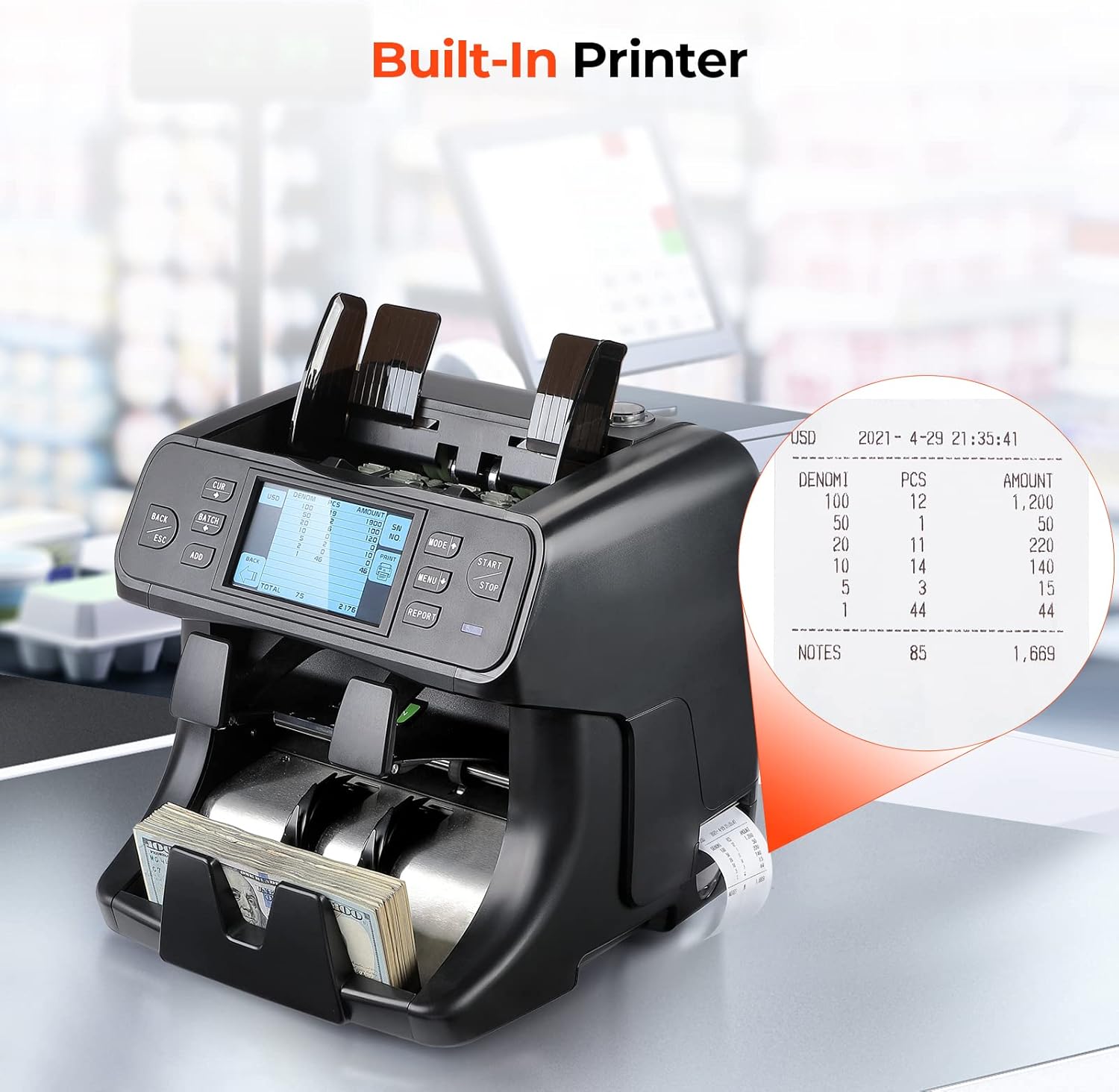
This is the final step. A 1-pocket machine might require you to “connect to the PC and upload the count data.” The IMC40 has a built-in receipt printer.
As 5-star reviewer Ken N. noted, this is the “upgrade.” The machine “counts by denomination and prints receipts directly from the machine to be attached as supporting documents.” This is the complete B2B workflow: a business owner can count a $10,000 deposit, get a printed, auditable receipt (with a full breakdown and optional serial numbers), and attach it to their bank deposit bag.

The Operational Reality (Jams & Rejects)
This high-speed, high-sensor system is not without its trade-offs. 1-star reviews like “Keeps jamming and rejecting the bills” are the other side of this coin. A machine with 12 counterfeit detection sensors is “picky.” It is designed to reject “worn, slightly damaged, and slightly ripped” bills.
For a user with low-quality “street cash” (like from a laundromat), this can be frustrating. It’s a balance between accuracy and pickiness.
Conclusion: The Difference Between “Counting” and “Processing”
The MUNBYN IMC40 is a case study in B2B workflow engineering. It is not a “money counter” in the traditional sense; it is a money processor.
The “1-pocket” machine solves the problem of “counting.”
The “2-pocket” machine, like the IMC40, solves the much larger business-process problem of “sorting” and “non-stop processing.” By combining 2CIS “eyes,” a “non-stop” reject pocket, and a built-in printer, it automates the entire cash deposit workflow, saving hours of manual labor and justifying its premium, “business-grade” price.


